School & coaching management, made in India

One place for your school’s attendance, fees, exams, homework, transport and parents.

Campus Pilot keeps one record of your school — every student, family, class, teacher and rupee — and gives the principal, the office, each teacher, every parent and every student their own view of it. On a computer in the office, or on any phone.

  • CBSE, ICSE, RBSE and state boards — and coaching institutes
  • Opens on any phone and installs like an app — nothing to download
  • In our cloud, on a dedicated server or on your own premises
greenwood.campus-pilot.in
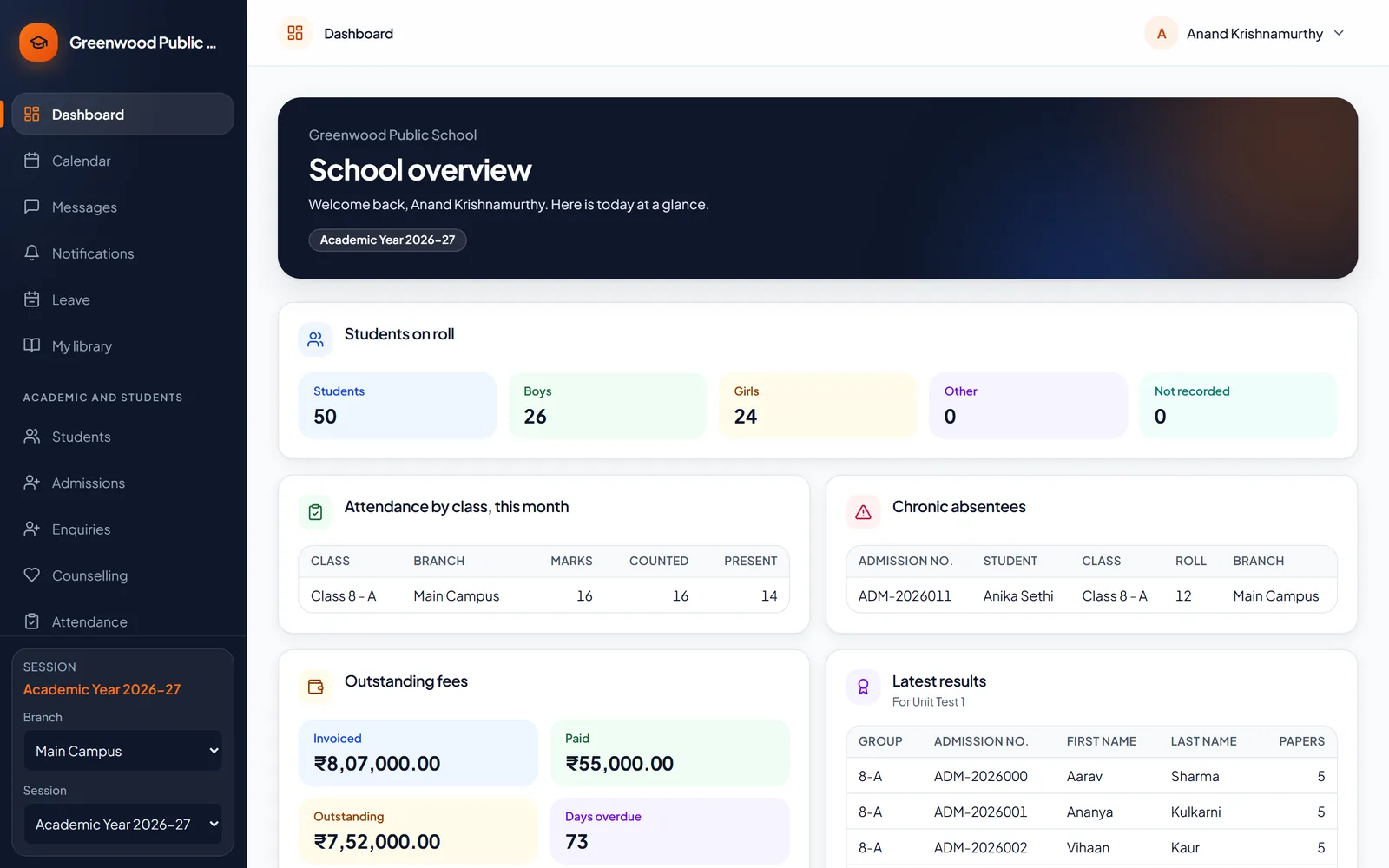
The principal's dashboard: students on roll, attendance, fees collected and the latest results
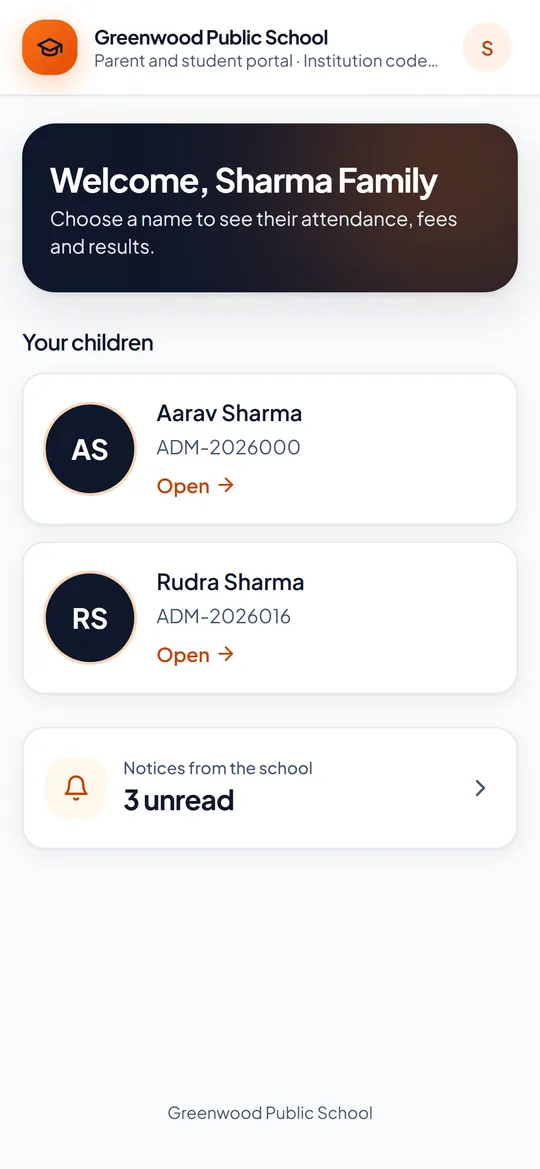
The parents' app on a phone
54 ready-made reports, with Excel and PDF export
13 ready-made roles, from principal to parent — or build your own
17 sections in each family’s app, from attendance to results
5 ways to reach families: in the app, phone notifications, SMS, email, WhatsApp
3 ways to run it: our cloud, a dedicated server, or your own premises

Why schools switch

The same school day, without the paperwork

Registers, receipt books, mark sheets and circulars each keep a copy of the same children. Campus Pilot keeps one, and everyone works from it.

BeforeA register book, a monthly total by hand, and phone calls home.

With Campus PilotA few taps on a teacher’s phone; the totals are worked out, and families are told.

BeforeReceipt books, a cash ledger and a late-evening tally.

With Campus PilotA receipt for every payment, and the day’s cash book ready on its own.

BeforeMarks in spreadsheets and report cards written one by one.

With Campus PilotMarks entered once; results and report cards for the whole school in one go.

BeforeCirculars lost in school bags, and diaries that never come back signed.

With Campus PilotNotices on every parent’s phone — in the app, by SMS, email or WhatsApp.

BeforeThe same child written into five registers by five people.

With Campus PilotAdmitted once — and in the register, the fee ledger, every exam and the parents’ app.

BeforeParents ringing the office to ask about fees, marks and homework.

With Campus PilotParents see attendance, homework, fees and results for themselves.

What is Campus Pilot?

One record of your school. The right view for everyone in it.

Campus Pilot is management software for schools and coaching institutes. The office admits a student once — and that student is then in the register, on the fee ledger, in every exam, on the report card and on their parents’ phone. Nothing is typed twice, and nobody waits for last month’s spreadsheet.

Each person signs in to see what their role allows: a teacher their own classes, the accountant the fees, a parent only their own children. The principal sees all of it.

One record students · families · classes · staff · fees
  • Principal
  • Office
  • Teachers
  • Accounts
  • Parents
  • Students

Your school’s own address

Staff and families sign in at your school’s own web address — such as greenwood.campus-pilot.in — and see your name, logo and colour, not ours.

An app on every phone

It opens in any phone’s browser and can be added to the home screen like an app, with notifications. Nothing to download from an app store, nothing to update.

One campus or many

Each campus keeps its own classes, staff and fee structures. A principal or an administrator sees one campus or all of them.

Runs where you want

In our cloud, on a server dedicated to your group, or installed on your own premises — the same product in each.

A day with Campus Pilot

One school day at Greenwood, start to finish

Follow one day at our demo school, from the first bell to the evening at home.

  1. 8:00 am

    The register, in a minute

    Teachers mark their class on a phone — everyone present in one tap, then the few who are absent, late or on half day.

  2. 8:30 am

    The principal sees the whole school

    Who is in, who keeps missing school, fees collected and the latest results.

  3. 10:00 am

    A family enquires about a place

    Reception records it, with who will call them back and when.

  4. 11:00 am

    Fees come in, every rupee receipted

    At the counter or online, with a receipt for every payment and the day’s cash book ready.

  5. 1:00 pm

    Admit cards for the half-yearly

    A whole class printed at once, with each paper’s date and day.

  6. 3:00 pm

    Homework goes home

    Set once by the teacher, and on every parent’s phone straight away.

  7. 4:30 pm

    One notice reaches every family

    In the app, as a phone notification, by SMS, email or WhatsApp.

  8. 7:00 pm

    Parents see the day

    Attendance, homework, fees and results for each of their children.

Features

Everything your school does, made simpler

Here is what each part of Campus Pilot does for you — in the words your office and staff room use.

Attendance

Take the register in a minute — and parents know the same morning.

Before: a register book, a monthly total by hand, and calls home. With Campus Pilot: a few taps on a phone, and the totals are done.
  • Mark the whole class present in one tap, then change the few who are absent, late or on half day
  • By the day, or period by period — the way your school takes it
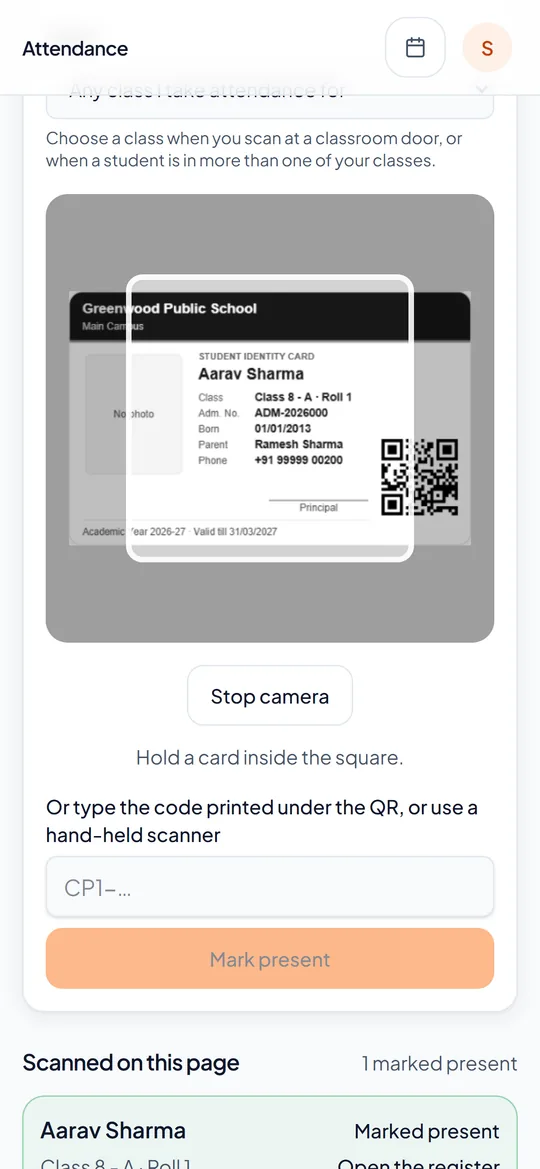
  • Or scan the QR code on each student’s ID card — with a phone, or a scanner at the gate
  • Parents of absent children can be told the same morning
  • Leave a parent applies for shows in the register once the class teacher approves it
  • Monthly totals, and the children who keep missing school, ready when you need them
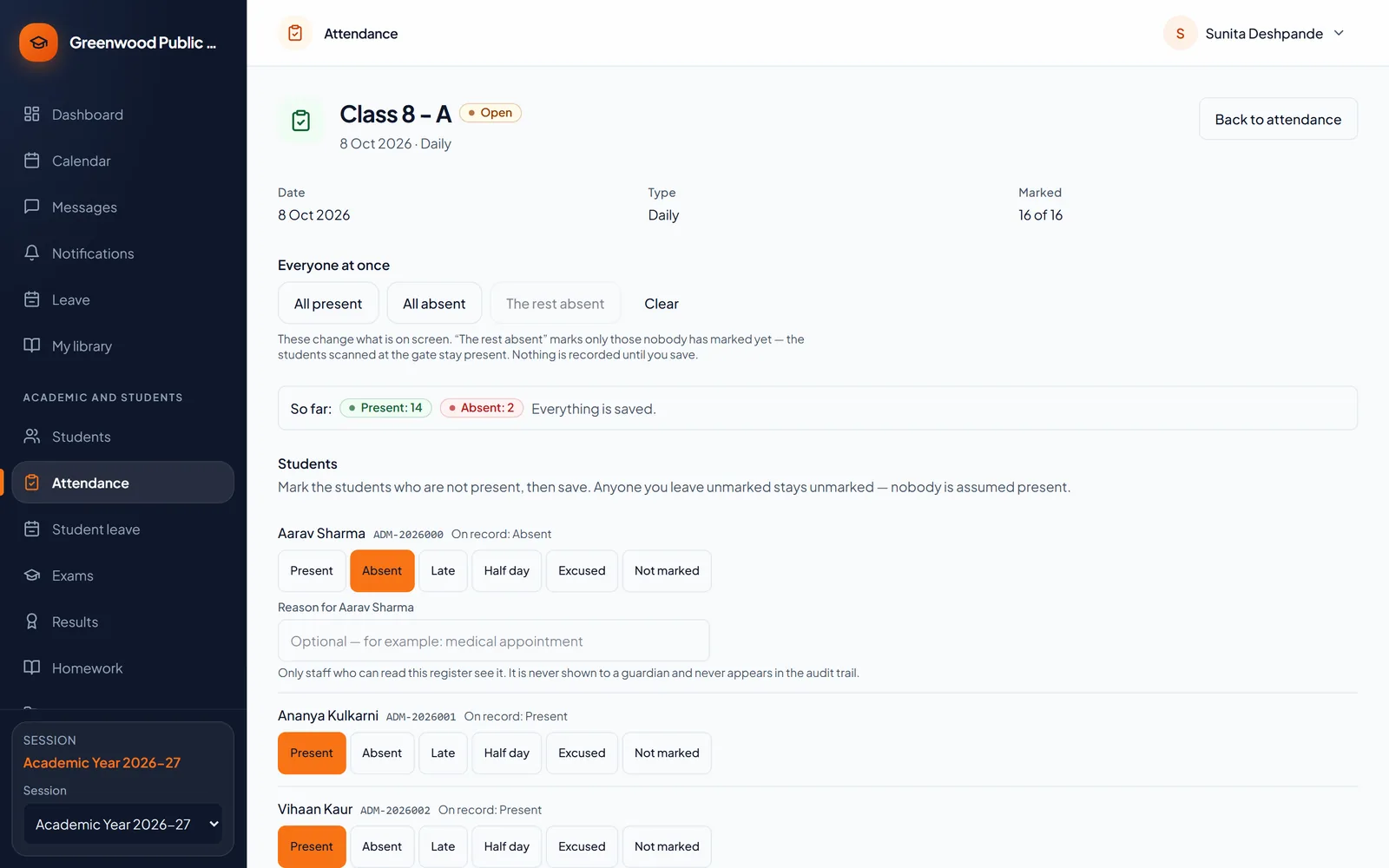
The attendance register for a class
A teacher's phone scanning a student's ID card: the student is marked present

Fees and receipts

Every rupee receipted, and every due followed up.

Before: receipt books, a cash ledger and a late-evening tally. With Campus Pilot: a receipt for every payment, and the day’s cash book ready.
  • Fee heads, instalments and the year’s fees, class by class
  • Cash, cheque, UPI, or online through your school’s own payment gateway
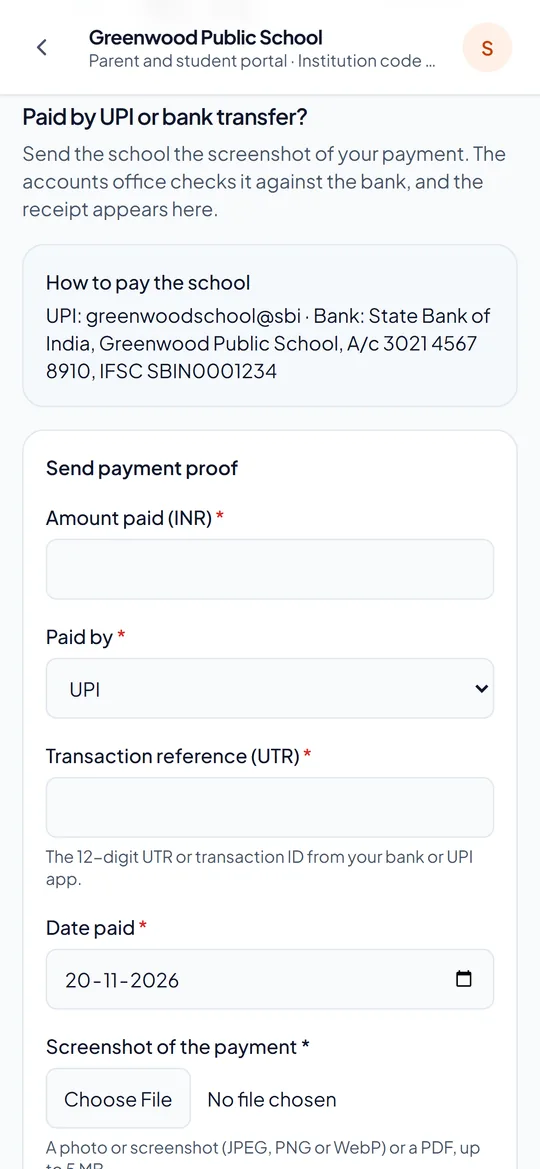
  • Parents send a screenshot of a UPI or bank payment; the accountant checks it and the receipt follows
  • Concessions need a second person’s approval
  • Late fees after the grace days you choose
  • The families with dues, and a reminder to all of them in one click
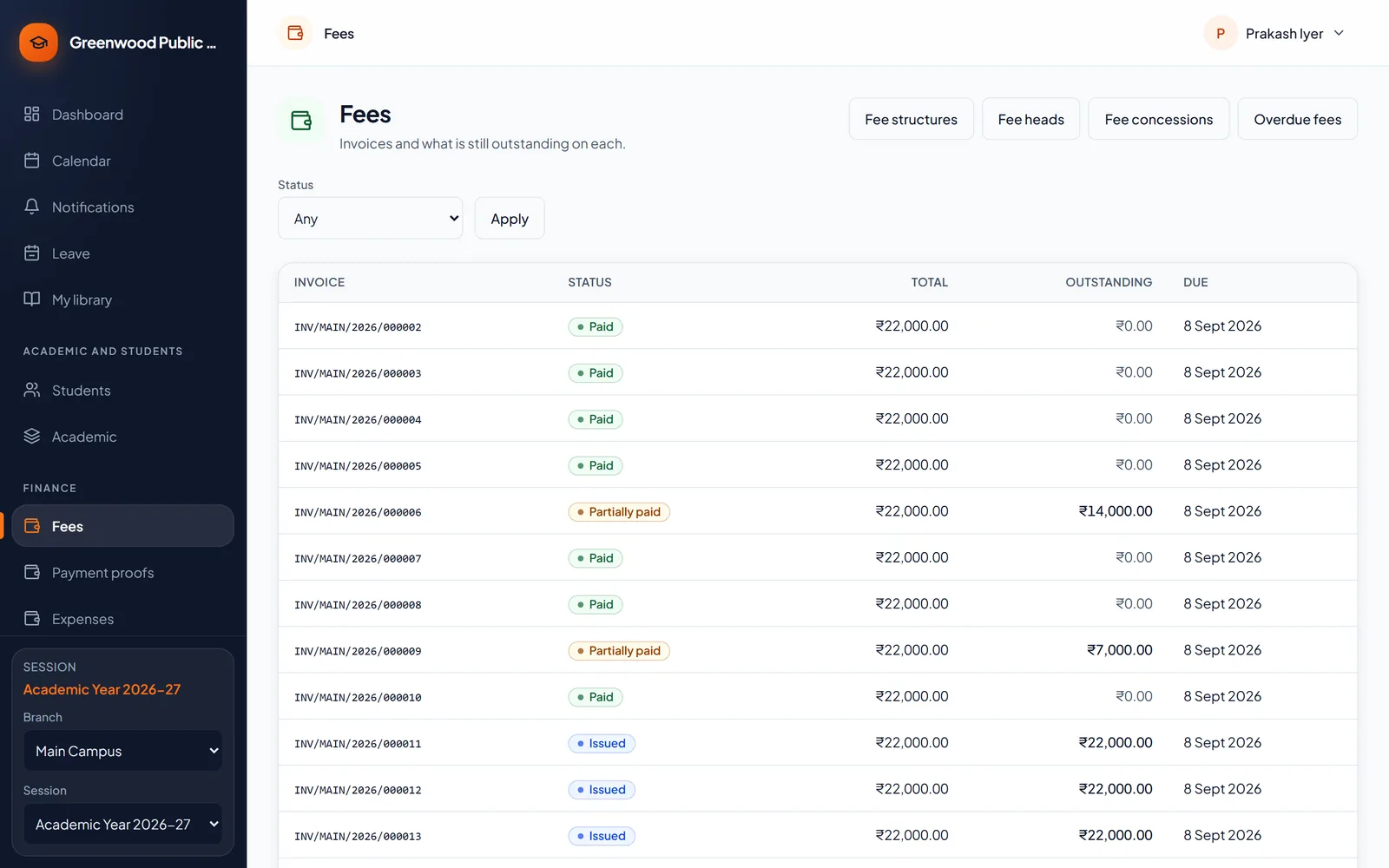
Fee invoices, paid, partly paid and due
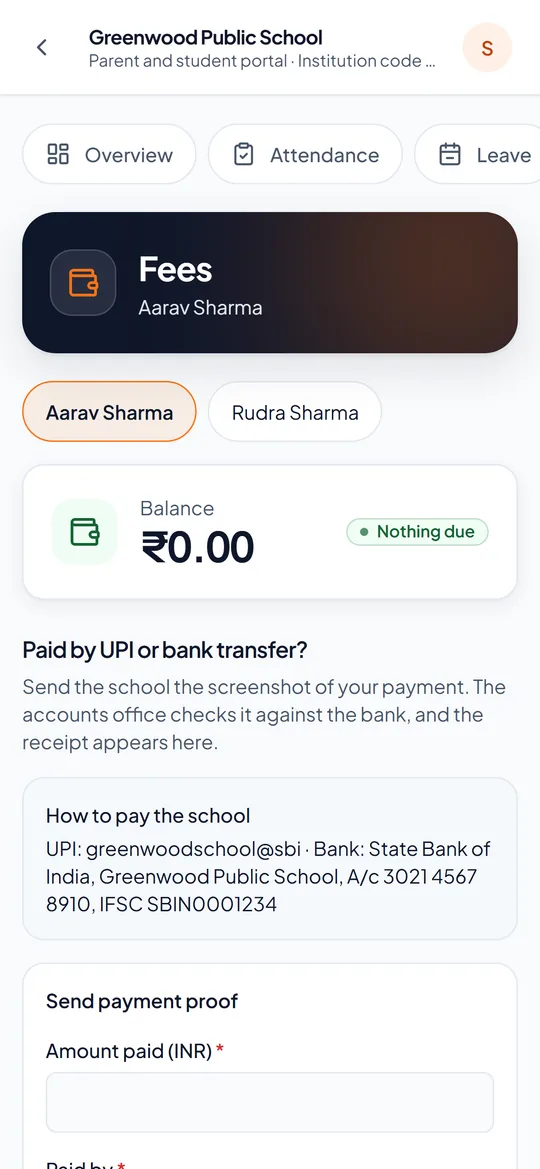
The parents' app: the school's UPI and bank details, and the form to send a payment's proof

Exams, admit cards and report cards

From the date sheet to the report card, without retyping a mark.

Before: admit cards typed one by one, and report cards written by hand. With Campus Pilot: a class’s admit cards in one print, report cards in one go.
  • Admit cards printed a class at a time, two to an A4 sheet, with each paper’s date and day, your instructions and signatures
  • Teachers enter marks for their own subjects; the class teacher sees the whole class
  • Marks are checked and approved before families see them
  • Totals, percentages, grades and divisions on your board’s own scale
  • Rankings by section, class or subject, with shared places for ties
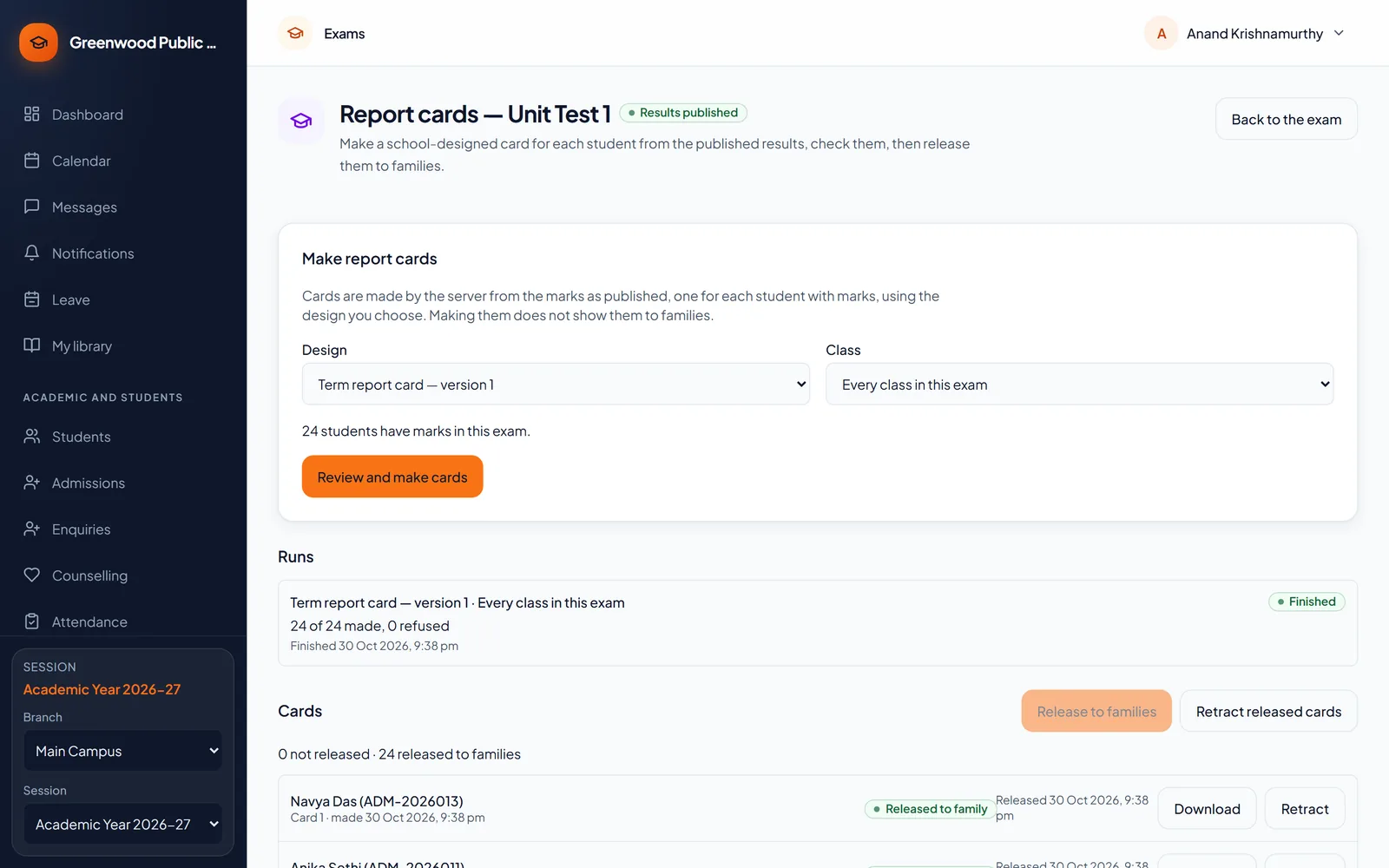
  • Report cards for the whole school, released to parents when you are ready
Report cards made for an exam and released to families

Homework and study material

Homework that reaches home — and gets handed in.

Before: homework copied from the board into a diary — or not. With Campus Pilot: homework on the parent’s phone, and who handed it in.
  • Set homework for a class, with a due date and instructions
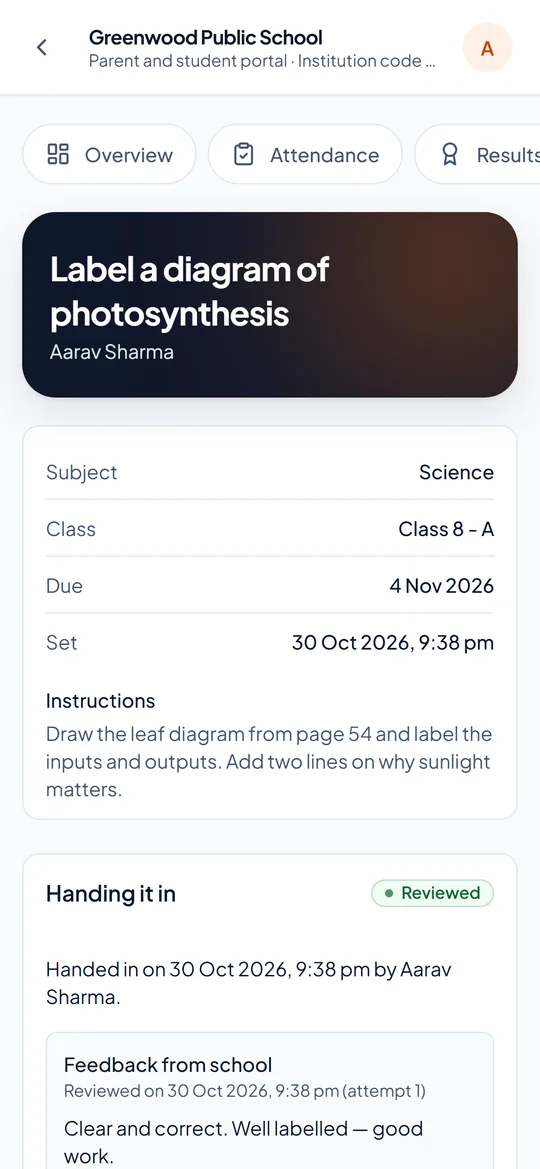
  • Students hand it in; the teacher reviews it and writes feedback
  • See at a glance who has handed it in and who has not
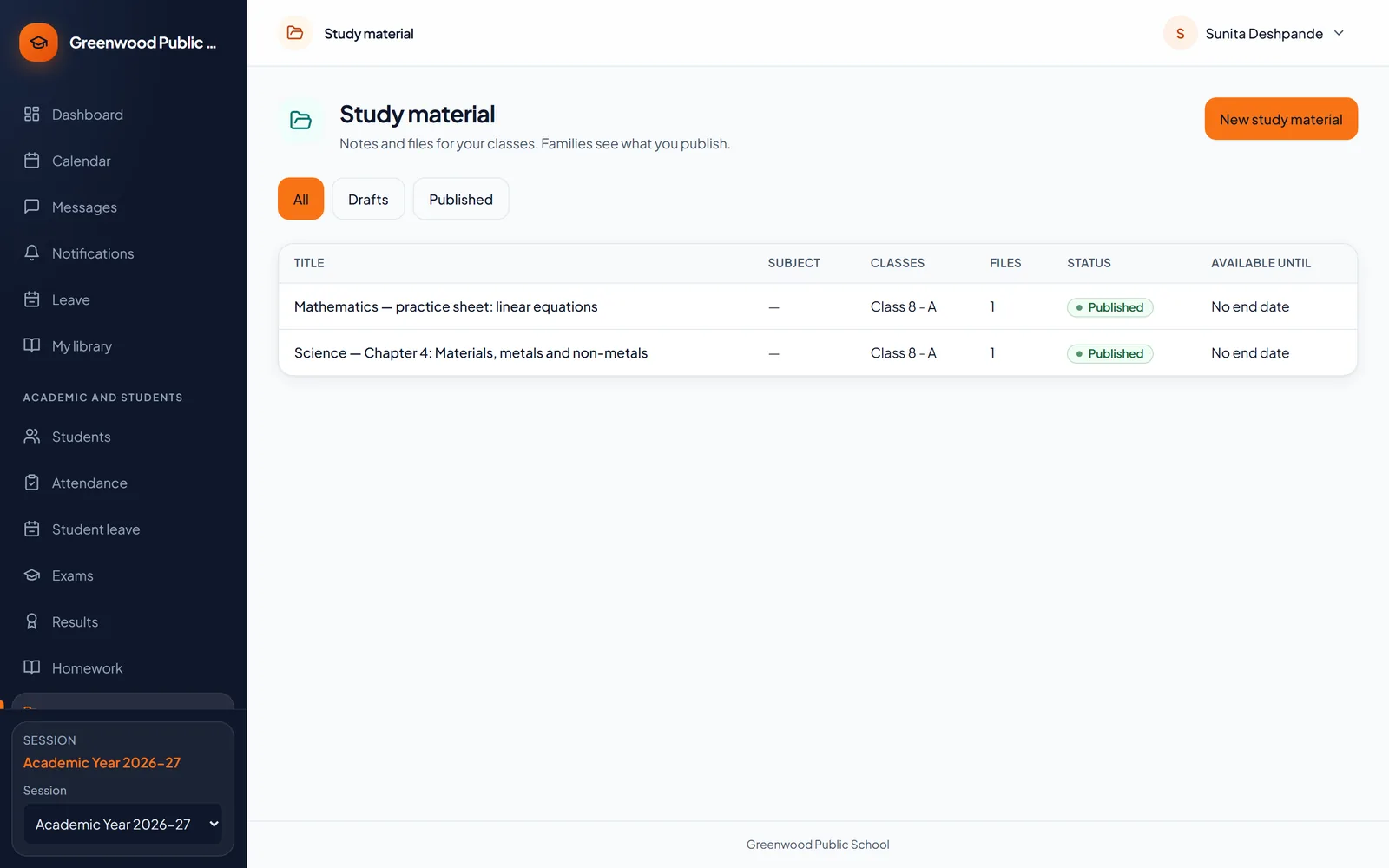
  • Share notes, worksheets and chapters with a class
  • Families see only what the teacher has published
Study material published for a class
Homework handed in and reviewed, on a student's phone

The parents’ app

Everything about their child, on the phone they already have.

Before: calls to the office, and notes in the school diary. With Campus Pilot: attendance, homework, fees and results on their phone.
  • Nothing to download: it opens in the phone’s browser and sits on the home screen like an app
  • Parents sign in with their mobile number and a one-time code (OTP) Planned
  • One sign-in for all of a family’s children
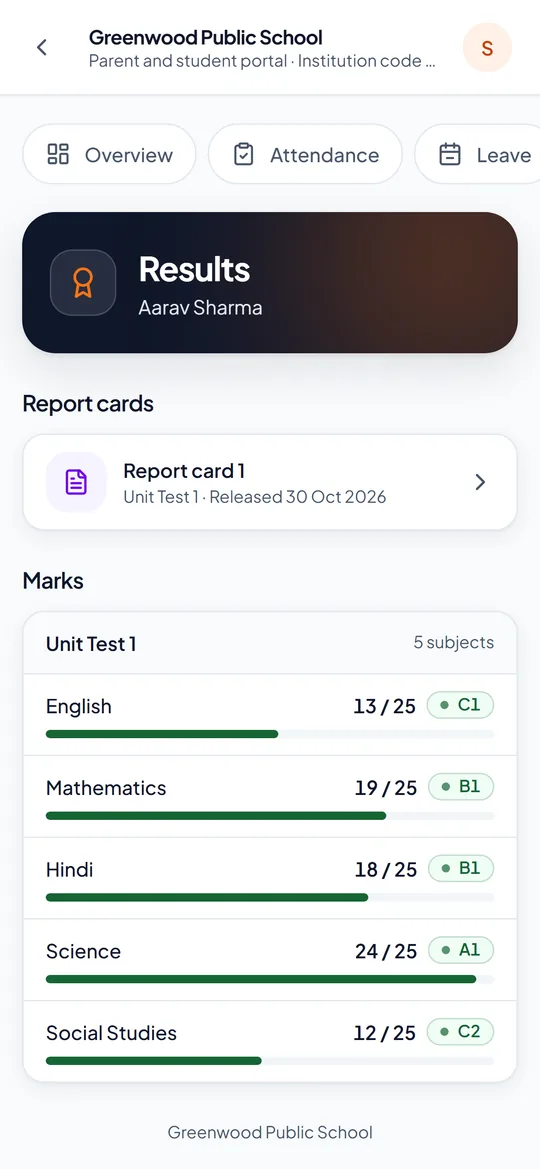
  • Attendance, homework, the timetable, fees, results and report cards
  • Apply for a child’s leave from the phone; the class teacher approves it
  • School notices and messages with teachers, with notifications
Results in the parents' app

Notices, messages, SMS and WhatsApp

Say it once, and it reaches every family.

Before: circulars in school bags, and a phone tree for emergencies. With Campus Pilot: one notice, on every family’s phone.
  • Notices to the whole school, one campus or one class
  • In the app, as a phone notification, by SMS, email or WhatsApp
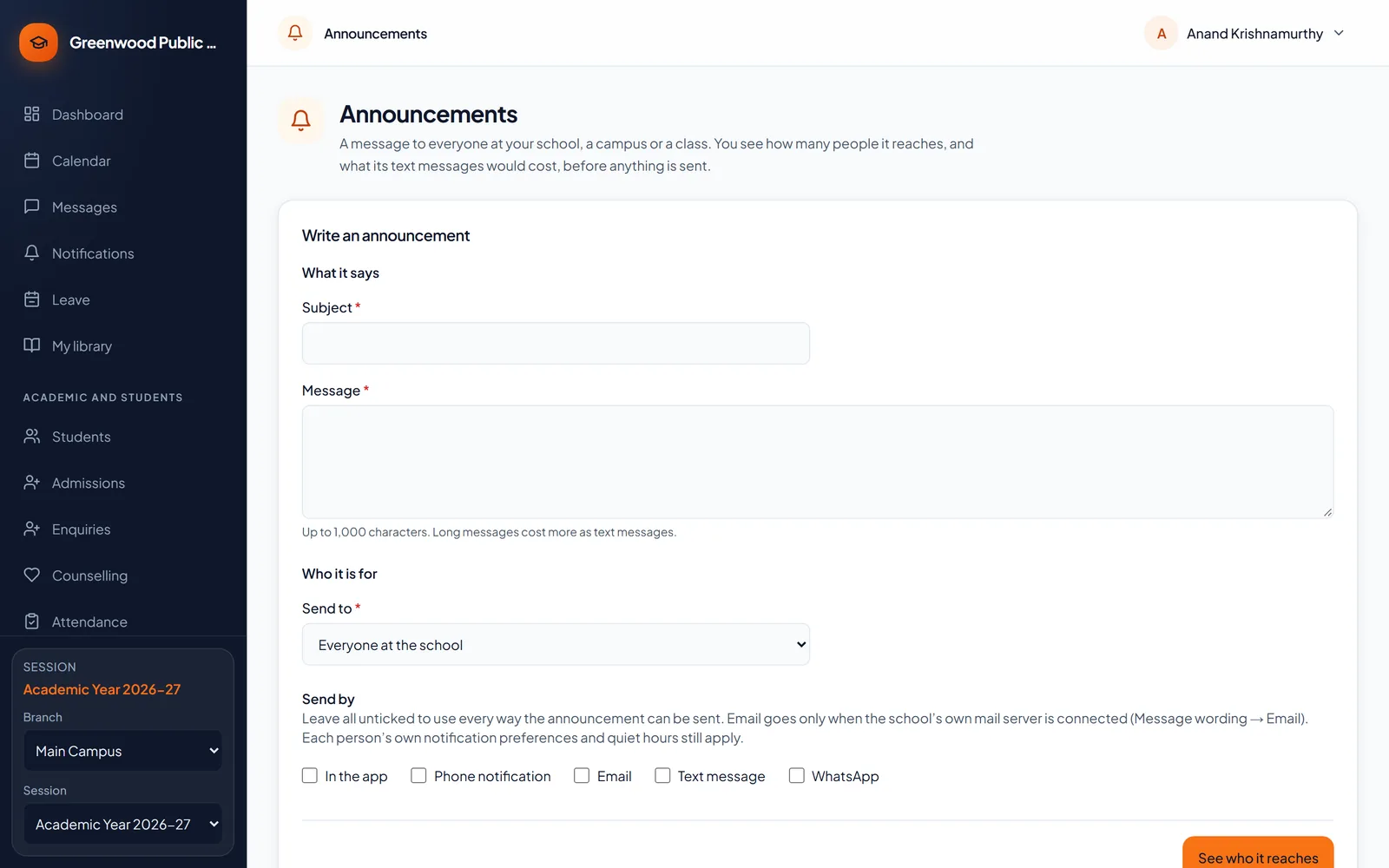
  • See how many people it reaches — and what the text messages cost — before you send
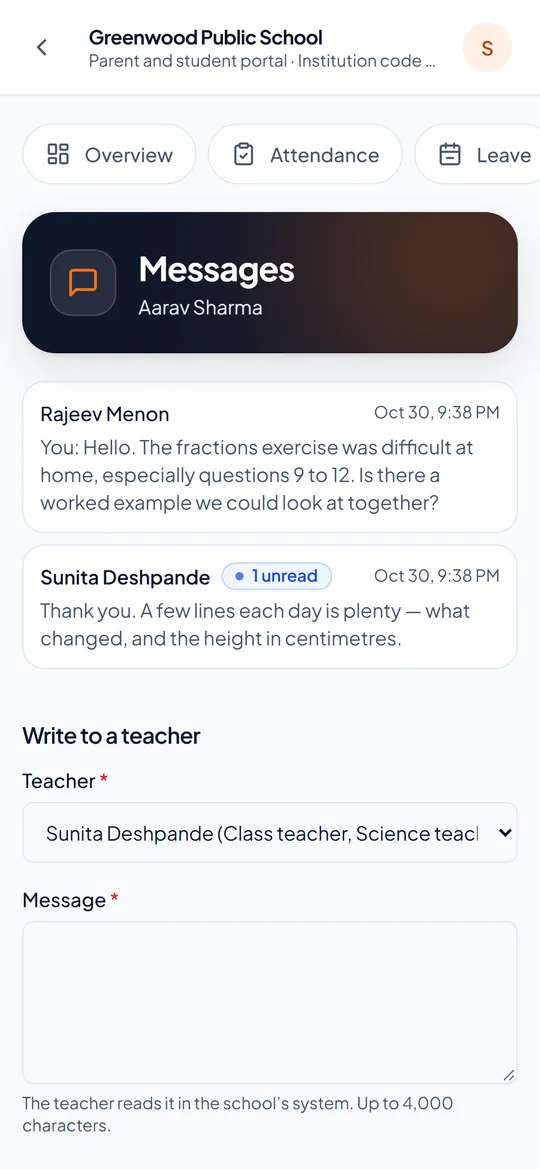
  • Teachers and parents write to each other; a teacher can write to the whole class
  • SMS with your school’s own sender ID, email from your own mail server, WhatsApp on your own number
  • Absences, fees due and results out told on WhatsApp by themselves, once you switch each one on — with a monthly limit you set
Writing a notice and choosing who it is for
Messages with teachers in the parents' app

Admissions and enquiries

No enquiry forgotten, from the first call to the admission.

Before: names on a notepad at reception, and calls nobody returned. With Campus Pilot: every enquiry, with who is calling back and when.
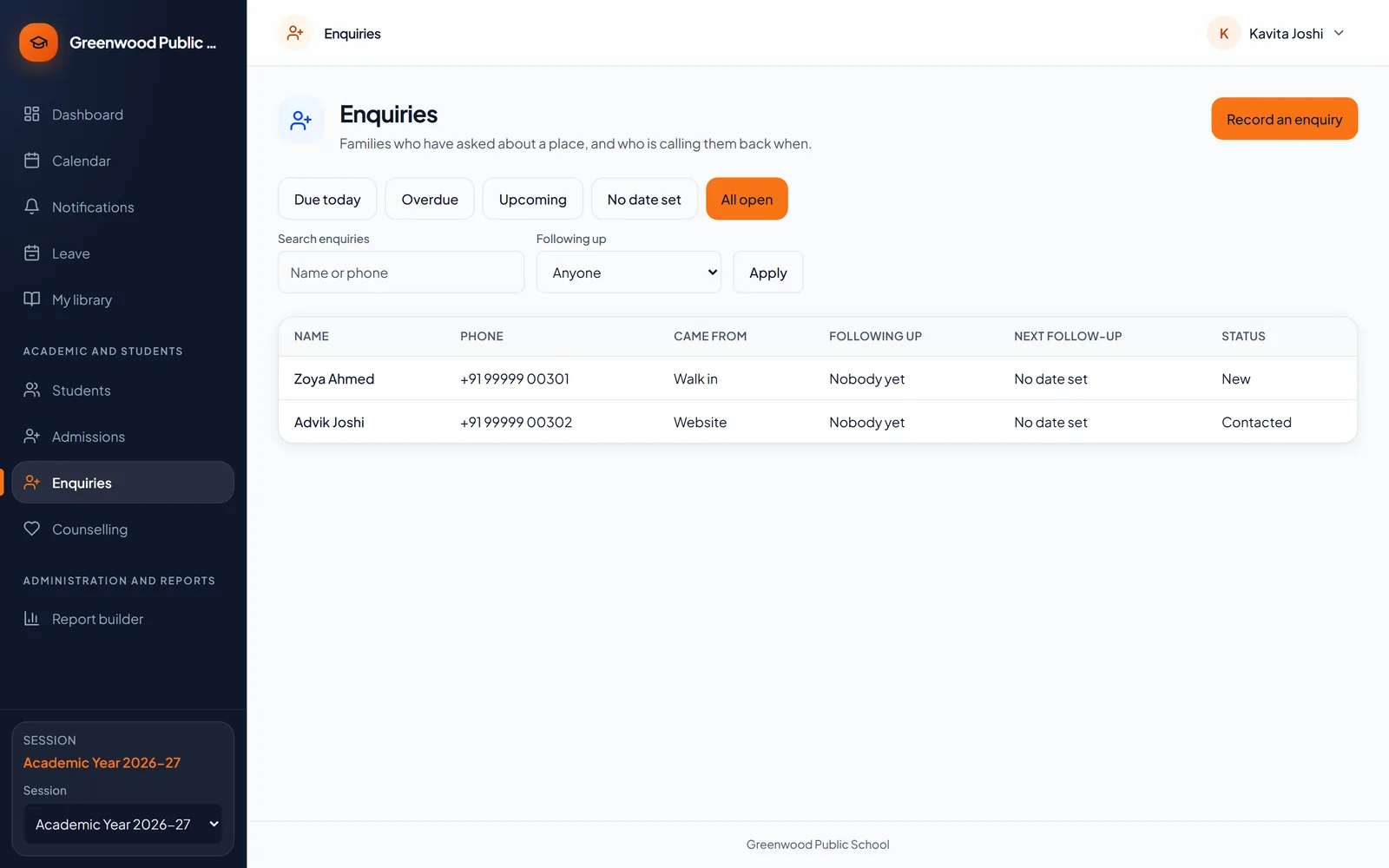
  • Walk-ins, phone calls and online enquiries in one list
  • Each enquiry has someone following it up, and a next date
  • Today’s and overdue follow-ups at a glance
  • Possible duplicates shown before you call a family twice
  • Once admitted, the student is ready for attendance, fees and exams — nothing typed again
Enquiries with who is following each one up

Transport, library and hostel

The services around the classroom, kept in the same place.

Transport

  • Routes, stops and vehicles
  • Each student’s route and stop, the same both ways
  • A warning when a bus is full
  • Parents see the driver’s and attendant’s phone numbers

Library

  • Students and staff borrow; books can be reserved
  • Late fines and lost-book charges go to the student’s fees
  • Books still out show on the TC and no-dues certificate

Hostel

  • Blocks, rooms and beds — a full room cannot be over-filled
  • Outings out and back, the night roll call and the visitor log
  • Parents see their child’s room and warden

Staff, leave and payroll

Staff records, leave and salaries in one place.

Before: leave on paper slips, and salaries worked out in a spreadsheet. With Campus Pilot: leave asked and approved online, payslips from the same records.
  • Staff records, with the subjects and classes each teacher takes
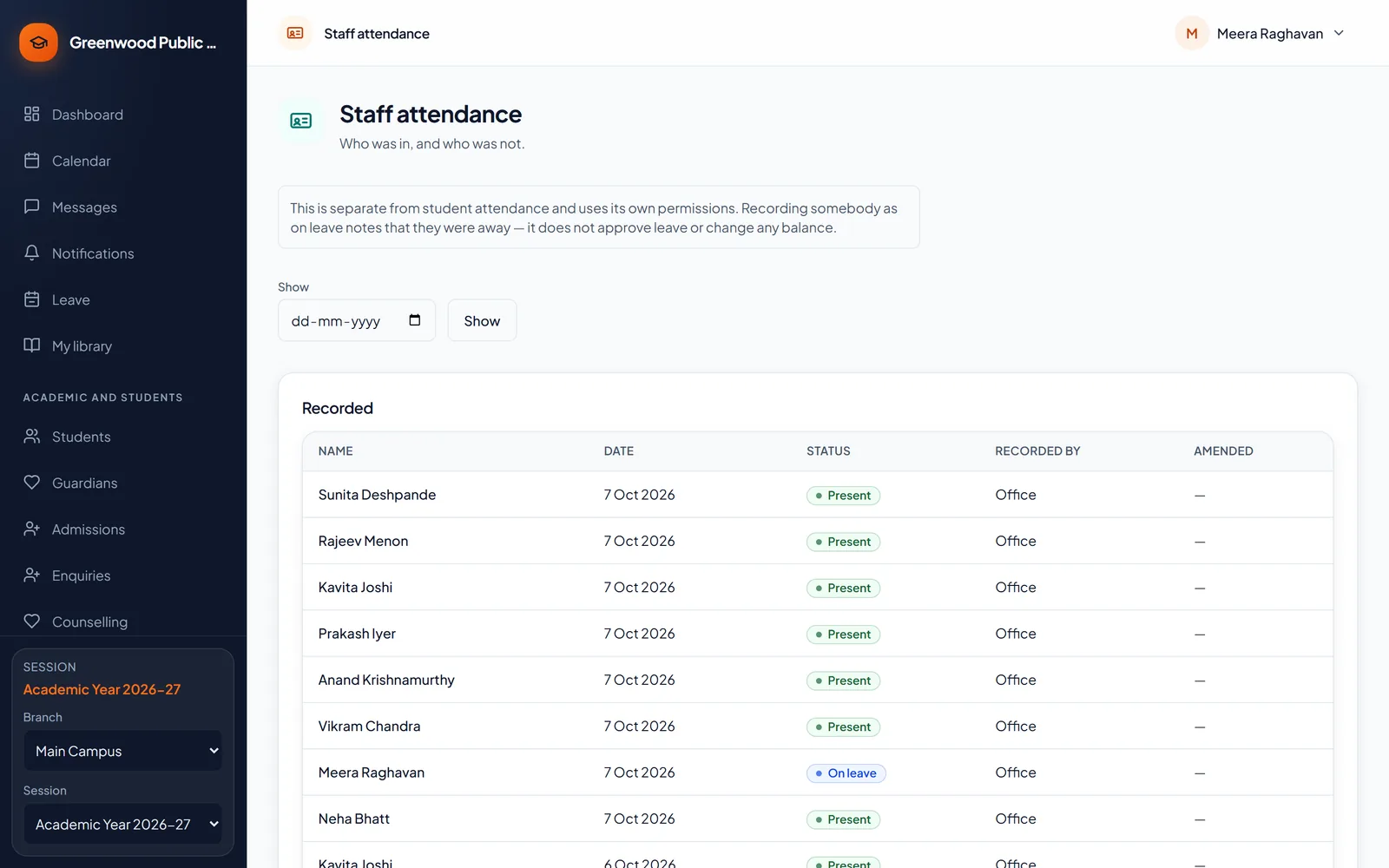
  • Staff attendance, marked each day by the office
  • Leave requests, approvals and balances
  • Monthly payroll and payslips, with loss-of-pay days
  • PF, ESI and professional tax when you switch them on
  • Each member of staff sees their own payslips and leave
Staff attendance for the day

Inventory and expenses

Know what the school has — and where the money went.

Before: a stock register in the store room, and bills in a file. With Campus Pilot: stock, issues and returns, and spending by head, each with its bill.
  • Keep stock of school items — books, uniforms, lab and sports equipment
  • Issue items and take them back, with who has what
  • Told when an item is running low
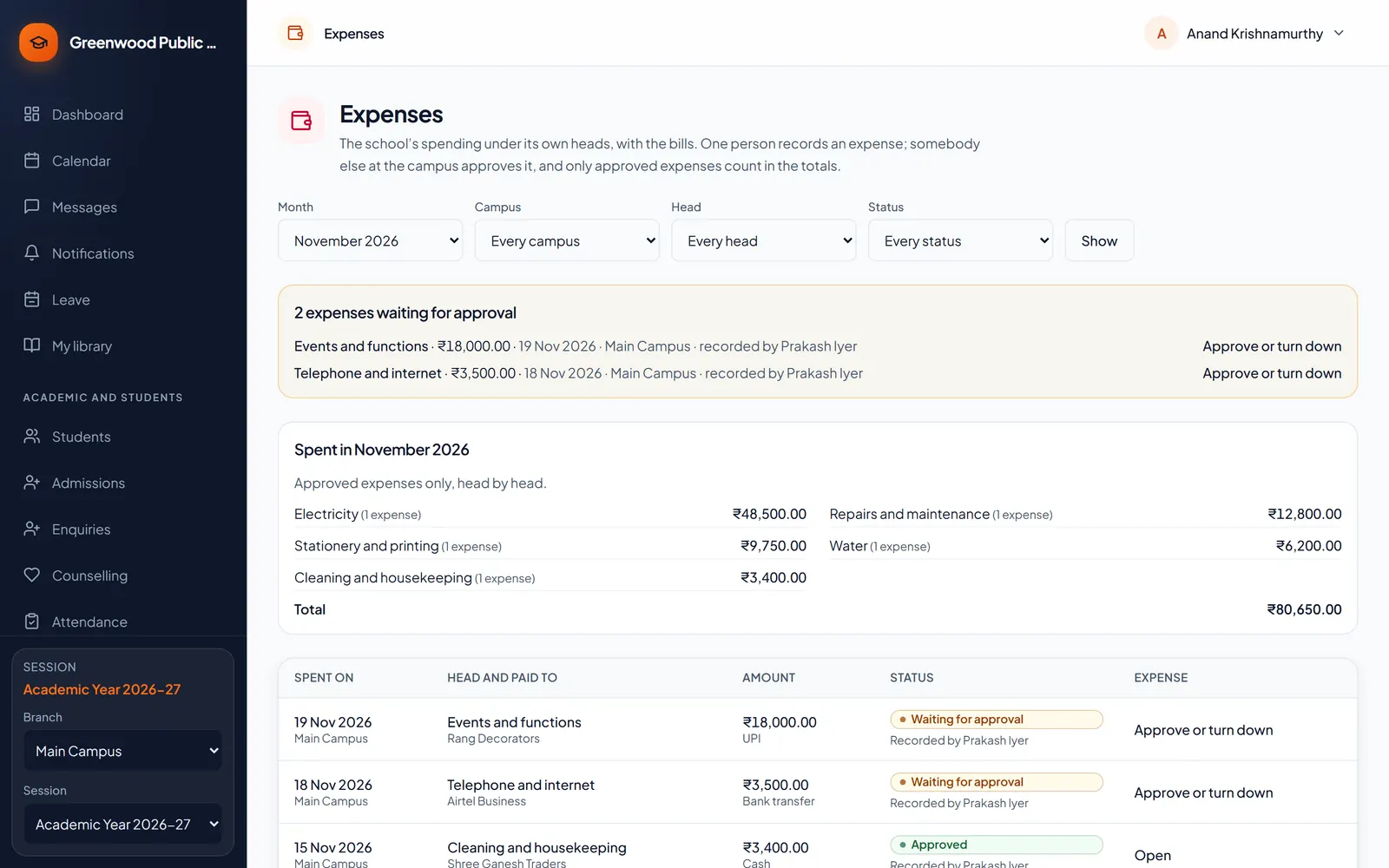
  • Record spending under heads like electricity, repairs and stationery
  • Keep the bill with each expense
  • A second person approves each expense
  • See what was spent under each head
The month's expenses: two waiting for approval, and what was spent under each head

Reports and dashboards

The whole school at a glance, and any list in a click.

Before: waiting for the month-end registers to be totalled. With Campus Pilot: a live dashboard, and 54 ready-made reports.
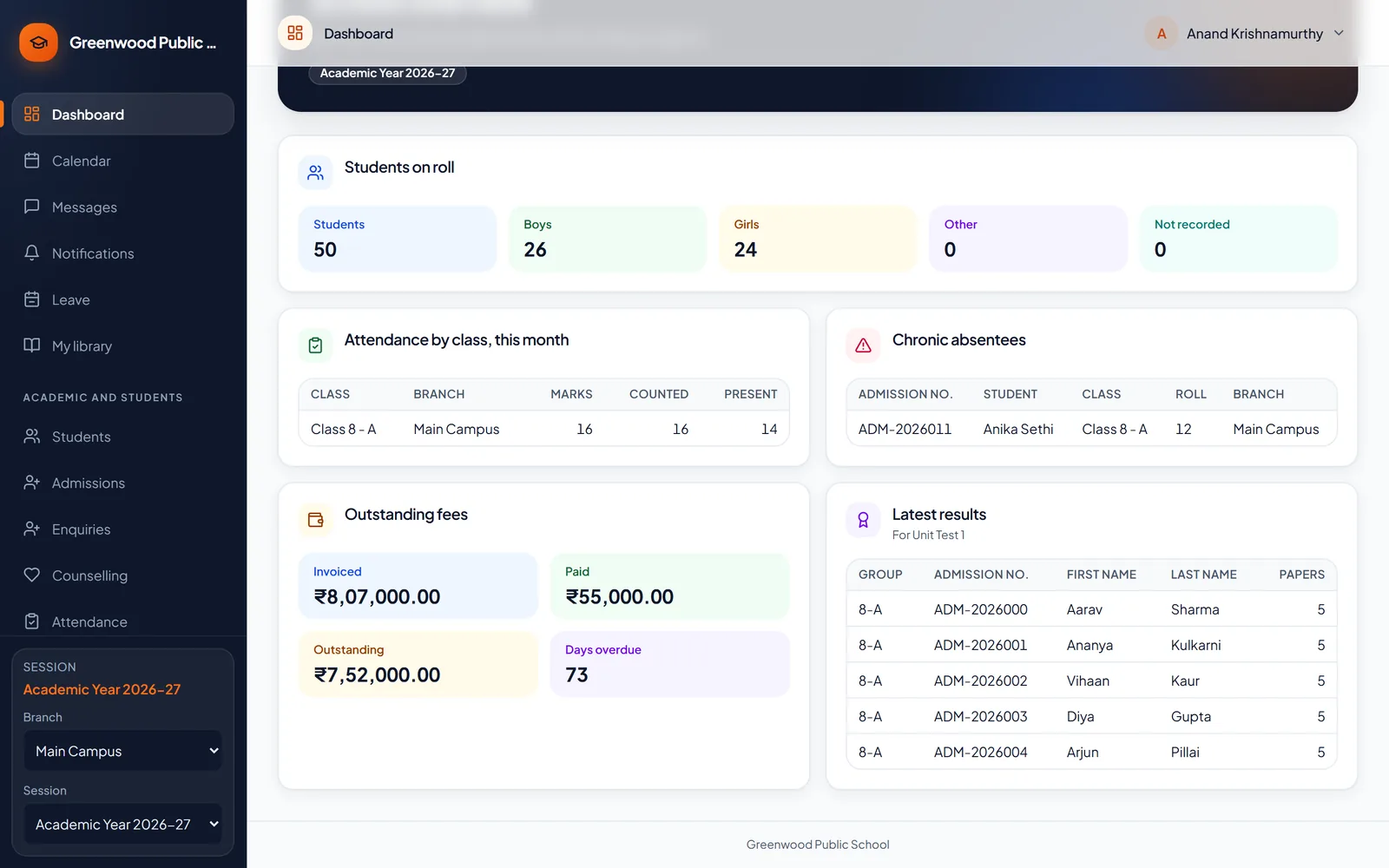
  • A dashboard for the principal: strength, attendance, fees and the latest results
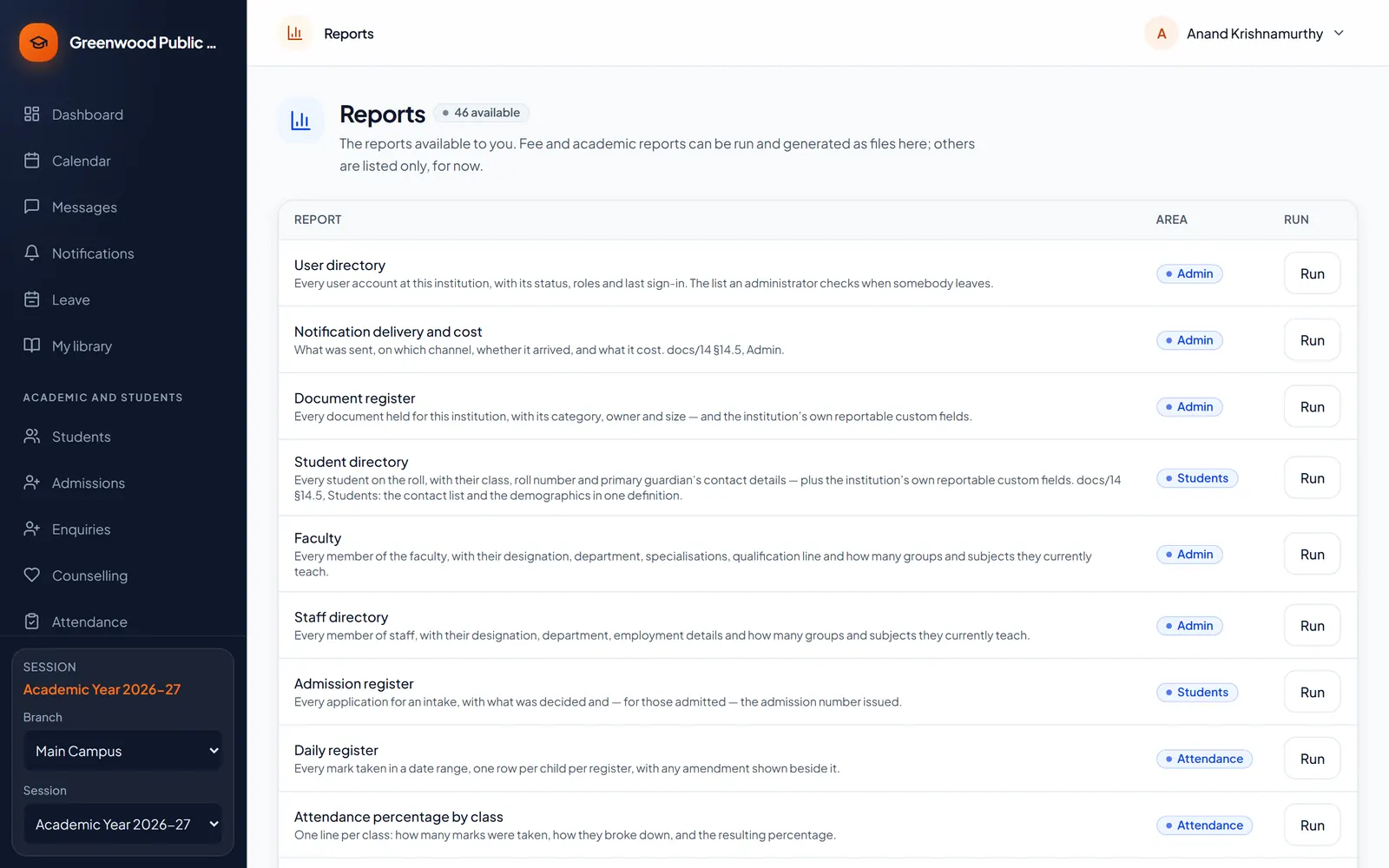
  • 54 ready-made reports — attendance, fees, exams, admissions, library, transport and more
  • Download any report to Excel or PDF
  • Make your own reports and charts — no code needed
  • A record of who changed what, and when
The principal's dashboard: students on roll, outstanding fees and the latest results

For each role

Everyone gets the screens they need — and only those

Thirteen ready-made roles cover a school from the principal to the parent. Change what any of them may do, or make your own.
Principal, campus administrator and institution administrator

  • A dashboard of the whole school: strength, attendance, fees and results
  • Approve marks and release results to families when you are ready
  • One campus or every campus, from the same sign-in
  • Decide who may do what, campus by campus
  • Ready-made reports, and your own reports and charts
  • A record of who changed what, and when
The list of ready-made reports

Teachers and class teachers

  • Take the register on a phone, by the day or period by period
  • Print admit cards for their class
  • Approve the leave parents apply for, and see it in the register
  • Scan the QR code on ID cards to take attendance
  • Set homework, see who handed it in, and share study material
  • Enter marks for the subjects they teach — a class teacher for the whole class
  • Their own week in the timetable, and messages with parents
  • Their own leave and payslips
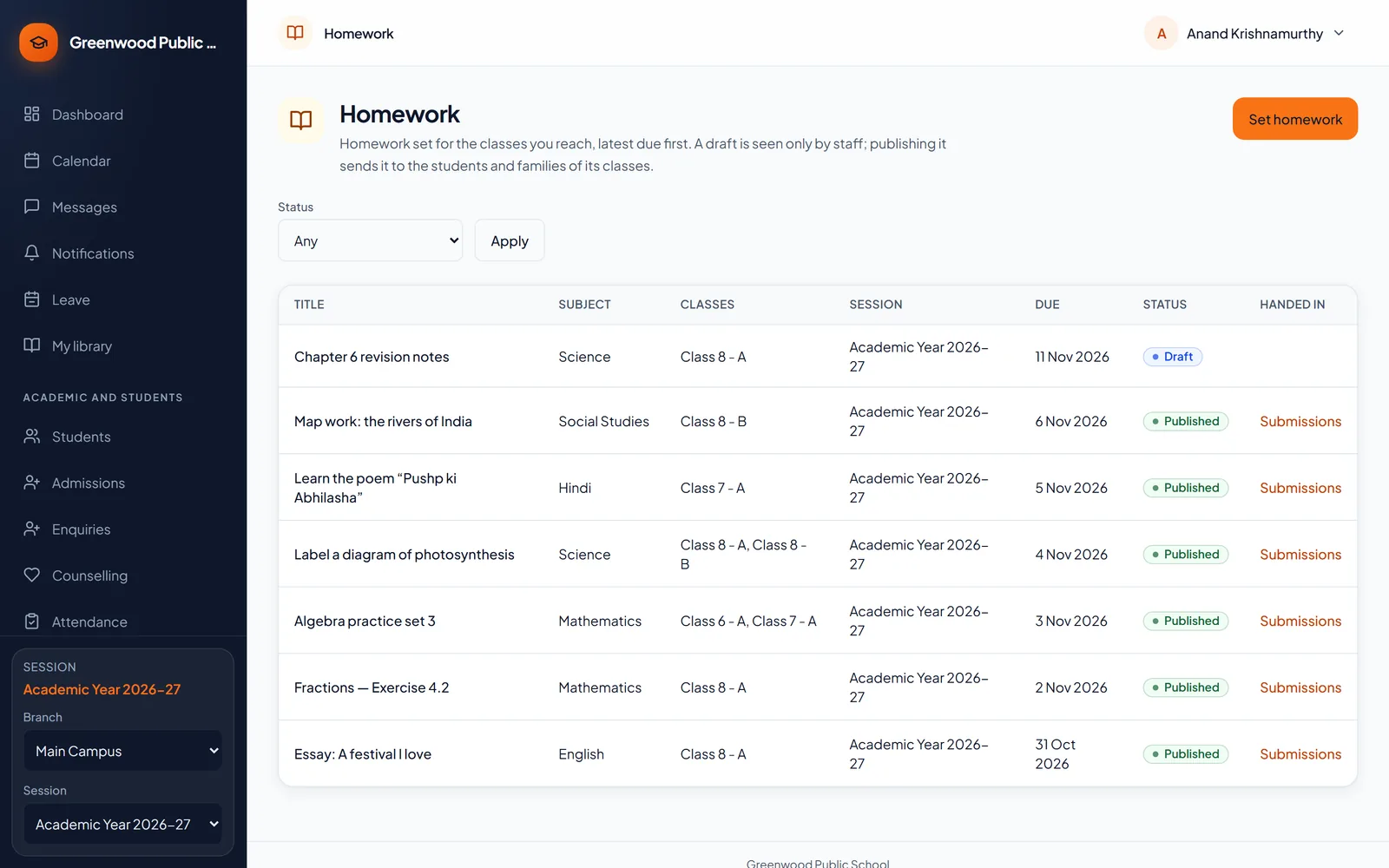
Homework set for a class, with who handed it in

Front office, admissions and accounts

  • Enquiries and admissions, with follow-ups so no family is forgotten
  • Fee receipts, concessions and late fees
  • The families with dues, and reminders in one click
  • Admit cards, ID cards, and transfer, bonafide and character certificates
  • Payment proofs from parents, checked before the receipt is made
  • Stock issued and returned, and school expenses with their bills
  • The daily cash book, and collection and dues reports
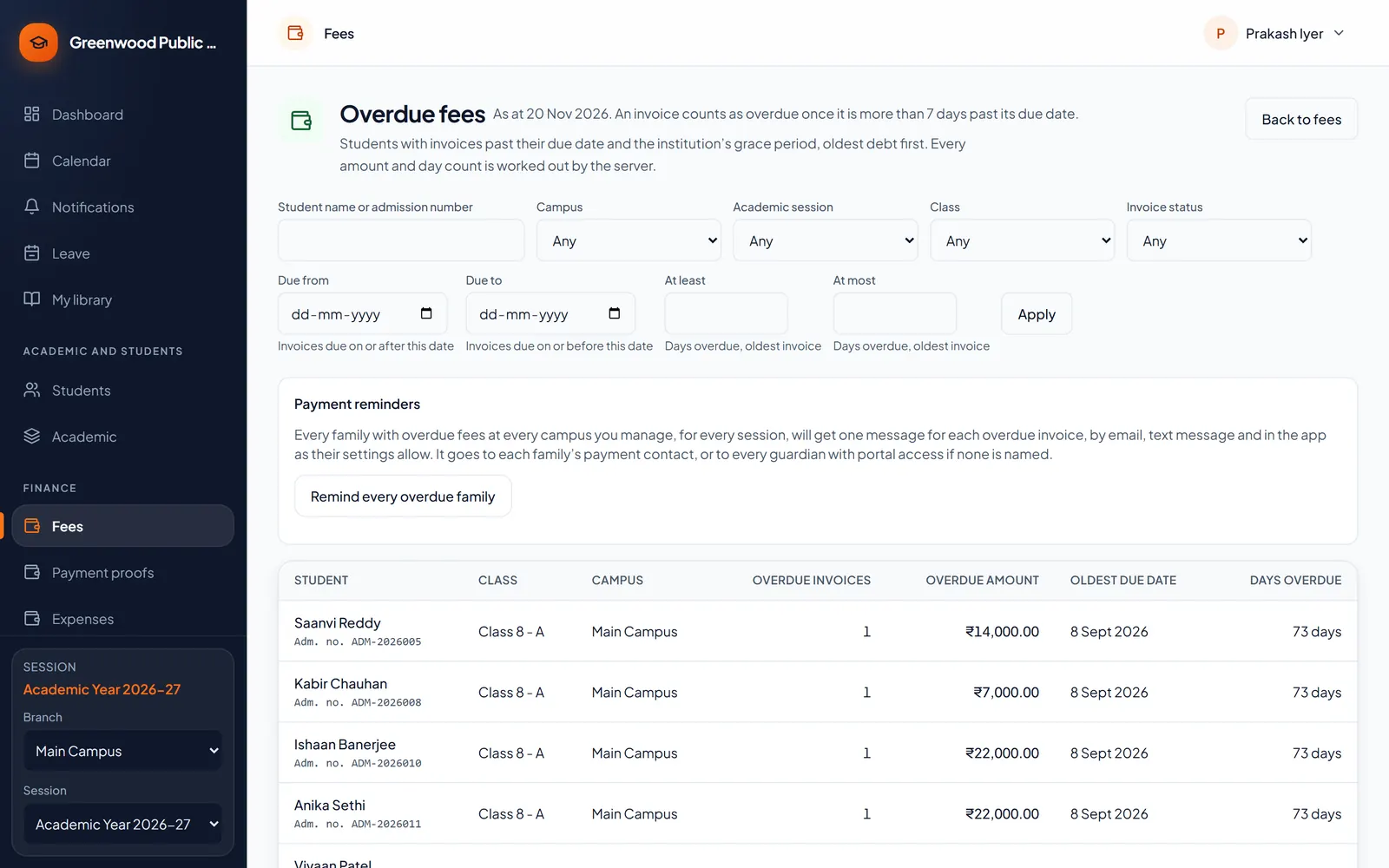
Families with fees overdue

Parents and students

  • One sign-in for all of a family’s children
  • Attendance, homework, timetable, results and report cards
  • Fees and receipts, and paying online through the school’s gateway
  • Applying for their child’s leave from the phone
  • Sending a screenshot of a UPI or bank payment for the accountant to check
  • Messages with teachers, class updates and school notices
  • Transport, hostel and library details where the school uses them
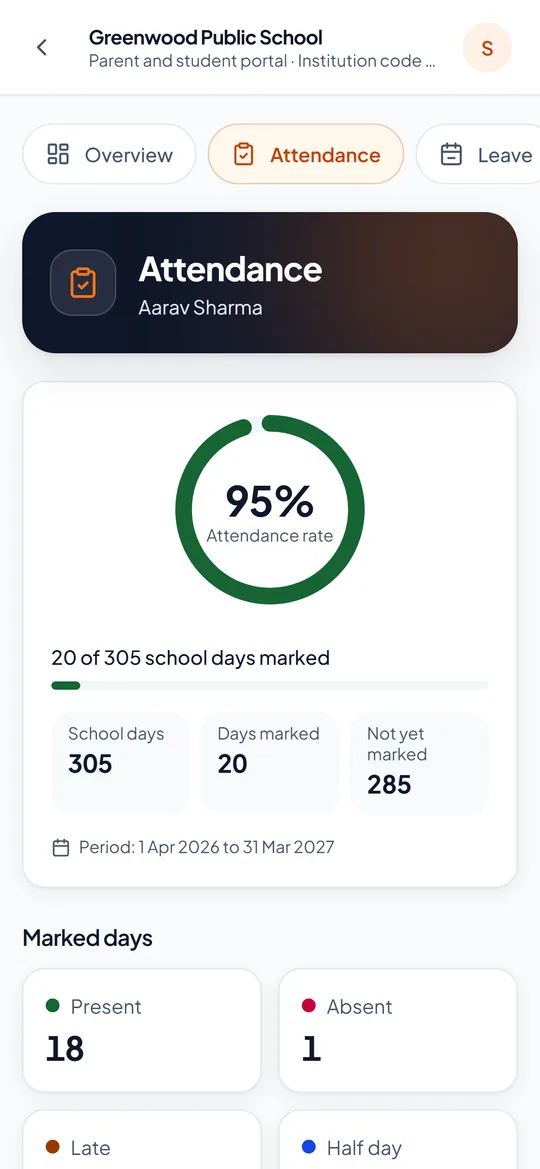
Attendance in the parents' app
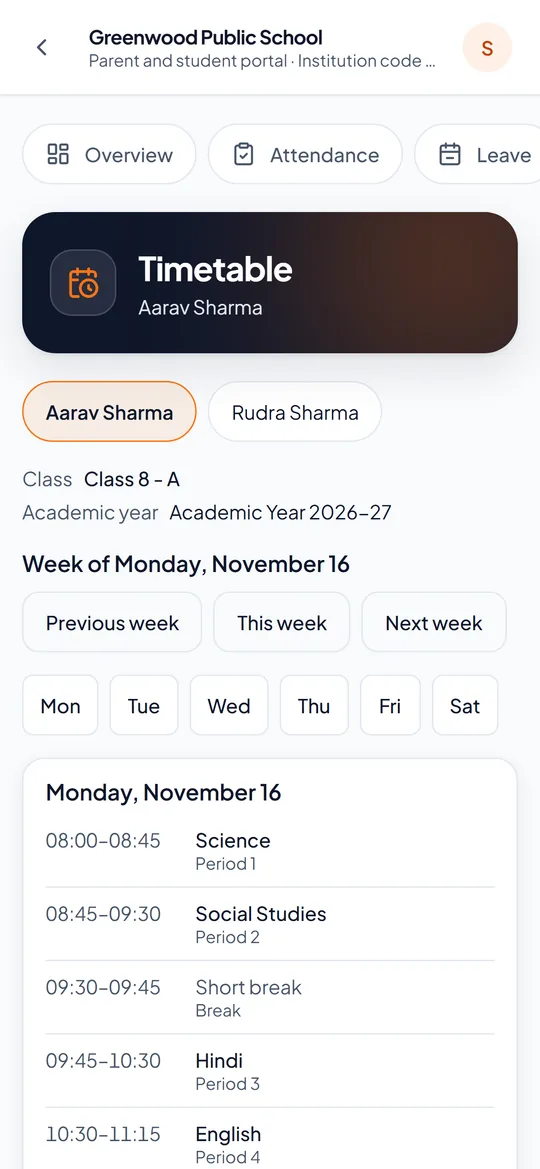
The week's timetable in the parents' app
Fees in the parents' app

HR, librarian, transport, hostel, reception and counsellor

  • HR: staff records, leave balances, payroll and payslips
  • Librarian: loans and reservations, late fines
  • Transport: routes, stops and riders; parents see the driver’s phone
  • Hostel: rooms, outings, roll call and the visitor log
  • Reception: enquiries, admissions and documents
  • Counsellor: sessions with private notes and follow-ups
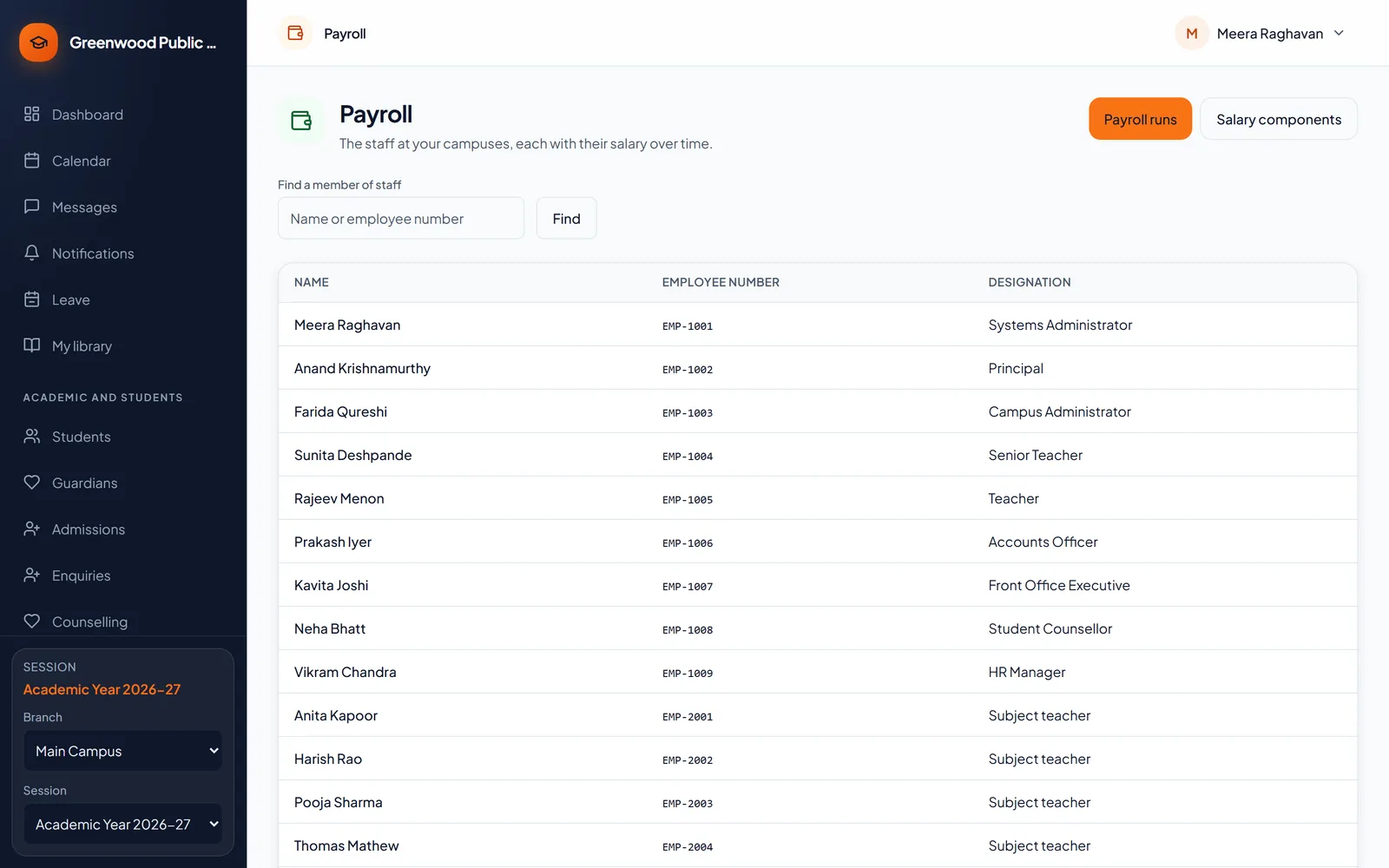
Payroll: the staff at a campus with their salaries

Getting started

From the first sign-in to a working school

Every step is a screen in Campus Pilot — no code and no technical work. Our setup guide walks your administrator through it, in this order.

  1. 1

    We open your school

    We create your school with the edition you choose, give it its own address and invite your administrator.

  2. 2

    Make it yours

    Your name, logo and colour; your numbering for admissions and receipts; the school year; your campuses.

  3. 3

    Set up classes

    Classes, sections and subjects — or batches for an institute — with grading scales and the timetable.

  4. 4

    Bring in your people

    Staff get their logins with the right role. Students come in from one Excel sheet, checked row by row before anything is saved.

  5. 5

    Fees and the calendar

    Fee structures for the year, holidays, kinds of leave and pay, and what your messages to families say.

  6. 6

    Families join

    Parents get their invitation and follow attendance, homework, fees and results from their phones.

Modules

Every module, at a glance

Every module shares the same students, staff and classes — nothing is typed twice. Start with what you need and add the rest later. See what is coming next.

Academic and students 15 modules

Students and guardians

Records, documents, PEN and families.

Admissions and enquiries

From the first call to the admission.

Attendance

By the day or by the period.

QR attendance

Scan ID cards with a phone.

Student leave

Parents apply from the phone; the class teacher approves.

Timetable

Weekly periods without clashes.

Homework

Set, sent home and handed in.

Study material

Notes and files for each class.

Exams and results

Marks entered, checked and released.

Admit cards

A class at a time, with each paper’s date.

Report cards

On your board’s own scale.

Rankings

By section, class or subject.

Certificates and TC

Transfer, bonafide, character, no-dues.

ID cards

For students and staff, a class at a time.

Documents

Uploaded, checked and kept safe.

Fees and finance 7 modules

Fee structures

Fee heads, instalments and invoices.

Receipts

Cash, cheque and UPI, each receipted.

Online payments

Through your school’s own gateway.

Payment proof

Parents send a UPI screenshot; you check it.

Concessions

With a second person’s approval.

Dues and reminders

Late fees, grace days and one-click reminders.

Expense tracker

Spending by head, bills kept, approved.

Staff and HR 5 modules

Staff and faculty

Records, subjects taught and profiles.

Roles and logins

Who may do what, on which campus.

Staff attendance

Marked each day by the office.

Leave

Requests, approvals and balances.

Payroll

Payslips; PF, ESI and PT when you need them.

Parents and communication 6 modules

Parents’ app

On any phone; installs like an app.

Messages

Between teachers and parents.

Class messages

To every family in a class at once.

Notices

The school, a campus or a class.

SMS, email and WhatsApp

Your own sender ID, mail server and number; automatic WhatsApp alerts.

School calendar

Events, exams and holidays.

Campus services 6 modules

Transport

Routes, stops, vehicles and riders.

Library

Loans, reservations and late fines.

Hostel

Rooms, outings, roll call and visitors.

Inventory

Stock, issues, returns and low-stock alerts.

Discipline

Incidents, shared with families as you choose.

Counselling

Sessions with private notes.

Reports and control 6 modules

Ready-made reports

54 of them, with Excel and PDF export.

Report builder

Your own tables, totals and charts.

Custom fields

On student and staff records.

Automation

The right staff told when something happens.

Webhooks and API

Connect your other systems.

Record of changes

Who changed what, and when.

For coaching institutes 4 modules

Batches

Programmes, seats and faculty.

Leads

Owners, follow-ups, lost reasons, a website form.

Online tests

Timed, shuffled, results when you publish.

Counselling

For every prospective student.

See it with your own classes and fee structure

A live, 30-minute walk-through set up for your school.

Book a free demo

For coaching institutes

Built for batches, not just classrooms

Campus Pilot knows the difference between a school section and a coaching batch — and between a family enquiring and a student ready to join.
  • Batches with programmes, seats and faculty
  • Enquiries and leads with owners, follow-ups, lost reasons and a website form
  • A morning reminder of the follow-ups due today
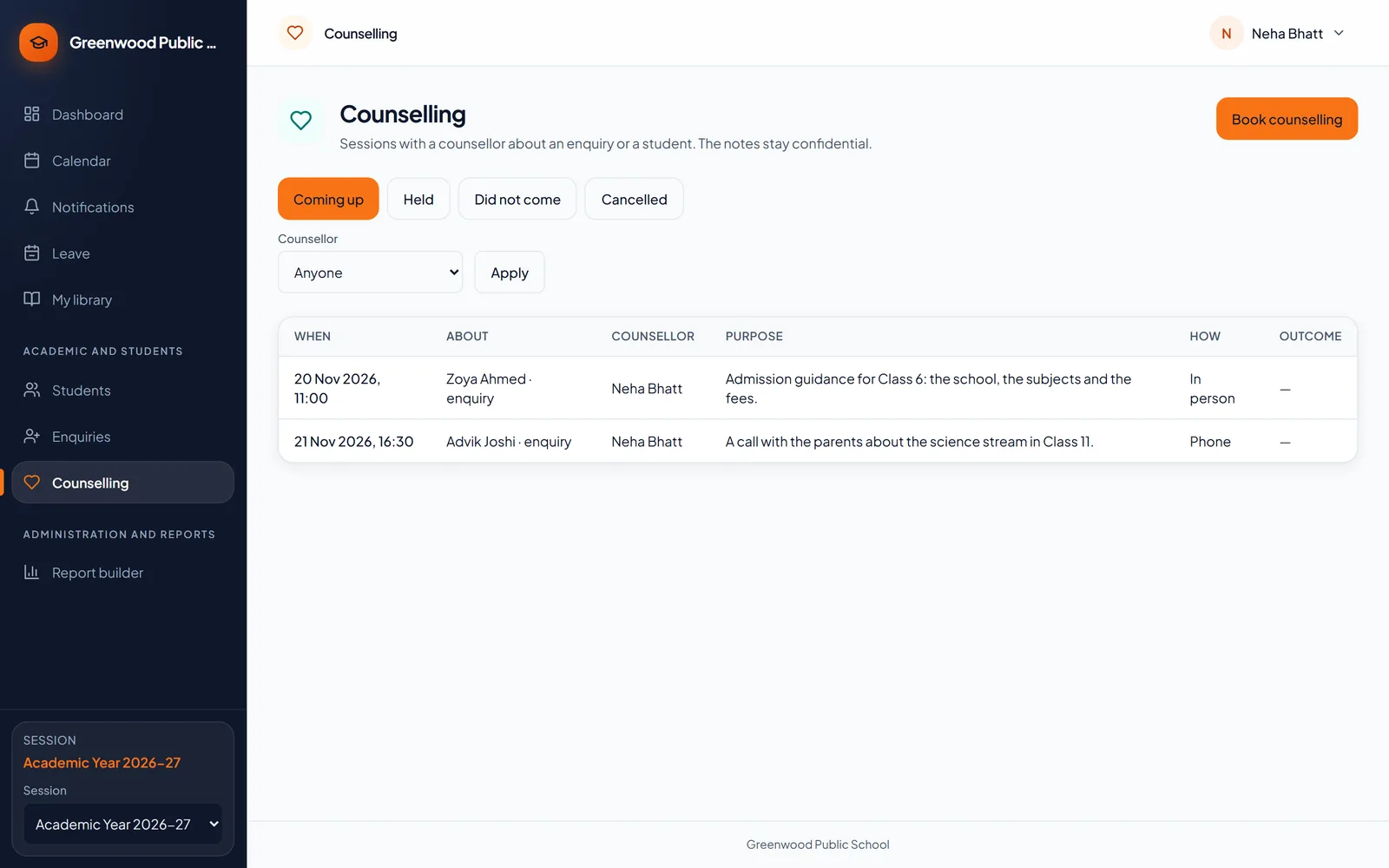
  • Counselling sessions for every prospective student
  • Online tests with a timer, shuffled questions and published results
  • Rankings and study material for every batch
See it for your institute
Counselling sessions booked for enquiries

Coming soon

What we are adding to Campus Pilot

None of these is available yet. Each one joins the features above when it is released.

On our roadmap

Planned

Android and iPhone apps

Today Campus Pilot installs on any phone from the browser. Apps for Android and iPhone are planned.

Planned

Parent sign-in by mobile

Parents sign in with their mobile number and a one-time code (OTP).

Planned

Biometric staff attendance

Punches from the school’s attendance machine going straight into the staff register.

Planned

Help desk inside Campus Pilot

Raise a support request and follow it from your own screens.

Planned

Your subscription and AMC in one place

Your plan, renewal dates and invoices, visible to the school.

Planned

Reports by email on a schedule

A saved report delivered to the principal’s inbox every week or month.

Planned

Hostel mess and meals

Menus and meal counts for hostel students.

Editions

Start with what you need

Every edition includes the core: students and staff, classes and sessions, roles, notices, the calendar, documents, staff attendance, leave and the standard reports.

Starter

For a small school or a single-branch institute

  • Admissions and enquiries
  • Attendance
  • Fees and receipts
  • Exams with results
  • Certificates and TC, ID cards
  • SMS and email
Request a quote

Professional

For multi-campus groups

  • Everything in Standard
  • Transport, library and hostel
  • Inventory and expenses
  • Discipline
  • Coaching lead management
  • Report builder and custom reports
  • API access
Request a quote

Enterprise

For large groups and on-premise

  • Everything in Professional
  • HR with advanced leave
  • Payroll
  • Workflow automation and webhooks
  • Dedicated deployment
Request a quote

Online payments through your own gateway are available from Standard. Online tests are for coaching institutes. Prices depend on the number of students and campuses — ask us for a quote.

Safe and private

Serious about your school’s data

Kept apart

Every school’s records are kept separate in the database itself, not just hidden on screen.

The right people only

Each role decides who may do what, and on which campus. A parent sees only their own children.

Every change recorded

A record of who changed what and when — and passwords and payment details are never written into it.

Never deleted

If a licence lapses, your data becomes read-only. Nothing is deleted because of a commercial change.

Backed up

Encrypted backups every night, with restores tested — not just promised.

Run it your way

In our cloud, on a dedicated server, or installed on your own premises.

FAQ

Questions schools ask us

Do parents need to download anything?

No. Campus Pilot opens in any phone’s browser and can be added to the home screen like an app, with notifications. There is nothing to download from an app store.

Can we use it on a mobile?

Yes — every screen works on a phone as well as on a computer. Teachers take the register on their phones, and parents can do everything from theirs.

How do parents sign in?

With the email and password from their invitation. One sign-in covers all of a family’s children. Signing in with a mobile number and a one-time code is on our roadmap.

Is our data safe and private?

Each school’s records are kept separate in the database itself, each person sees only what their role allows — a parent only their own children — every change is recorded, and backups are encrypted every night.

Can we start in the middle of a session?

Yes. Set up the current school year, bring in your students and staff, and start from the day you begin. Earlier attendance and marks do not have to be typed in first.

How do we move our existing data?

Students are imported from an Excel sheet. The import checks every row before anything is saved and tells you exactly what to fix.

Which boards do you support?

CBSE, ICSE, RBSE and other state boards, with grades or divisions as your board uses them. Coaching institutes need no board at all.

Will it carry our school’s name and logo?

Yes. Your school’s name, logo and colour are on every screen your staff and parents see, and on your receipts and certificates.

Do Hindi names print correctly?

Yes. The screens are in English, and names and words written in Hindi print correctly on receipts, report cards, certificates and the other documents.

Can parents pay fees online?

Yes, from Standard: through your school’s own payment gateway, with the receipt on their phone. Parents can also send a screenshot of a UPI or bank payment; the accountant checks it, and the receipt follows.

Can we use our own SMS, email and WhatsApp?

Yes. Messages go out with your school’s own SMS sender ID, through your school’s own mail server, and on WhatsApp through your school’s own number. On WhatsApp, families can also be told of an absence, a fee due or results out automatically — each switched on by you, only to families who agreed to WhatsApp.

Who can see what?

Each person’s role decides it. Thirteen ready-made roles cover a school — principal, teacher, accountant, librarian, parent and the rest — and you can change any of them or make your own.

We have more than one campus. Does that work?

Yes. Each campus has its own classes, staff and fee structures, and a principal or administrator can see one campus or all of them.

Is it for coaching institutes too?

Yes. An institute works in batches rather than sections, follows its enquiries as leads, and can hold timed online tests whose results it publishes when ready.

What happens to our data if we stop?

It stays yours. A lapsed licence makes the system read-only — nothing is deleted — and you can export your records.

How do we get help?

Call or WhatsApp us on +91 97822 20420, or write to support@campus-pilot.in. Support and updates come with your school’s annual maintenance contract (AMC).

Book a demo

See your school in Campus Pilot

Tell us a little about your school and we will set up a live, 30-minute walk-through with your own classes and fee structure.

  • Your classes, sections and fee heads in the demo
  • Every role shown: principal, office, teacher and parent
  • A quote for your number of students and campuses

A day at Greenwood, in five minutes

Narration